

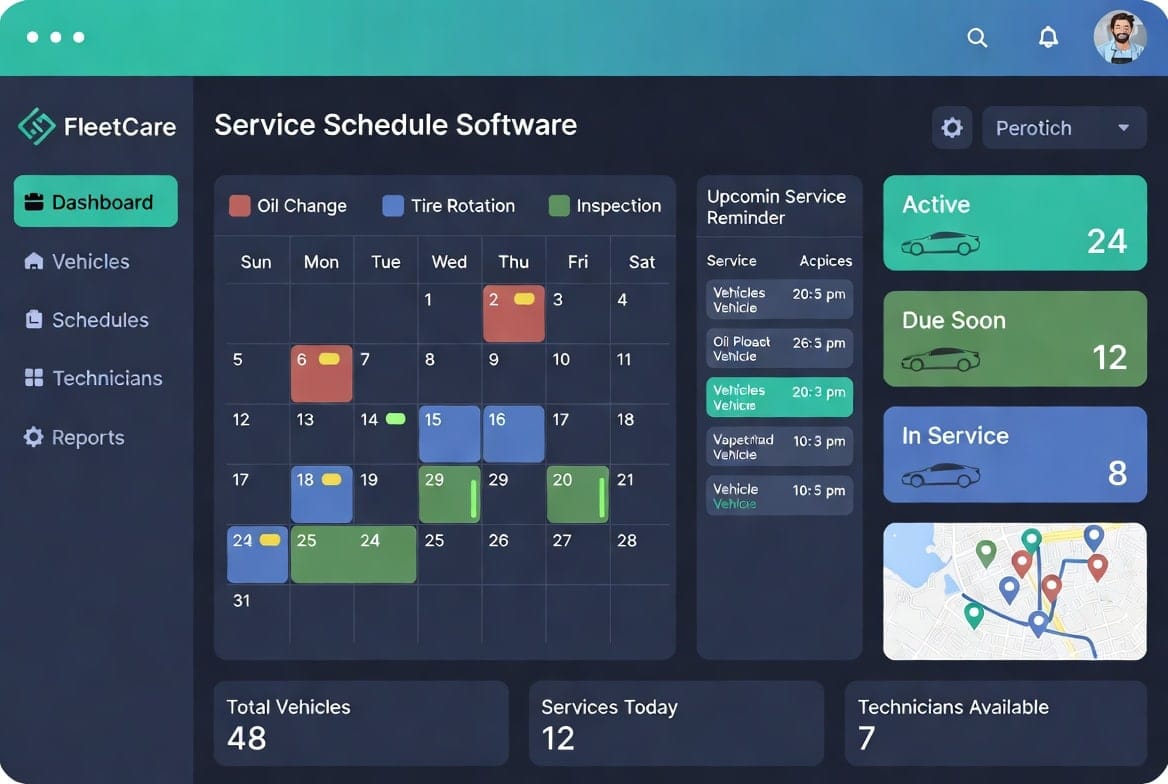
Service schedule software is a powerful digital tool that helps fleet managers plan, track, and execute maintenance jobs with ease. You no longer need to juggle spreadsheets, phone calls, and paper notes every day. This software brings all your service tasks into one clear system so you can book jobs, assign the right technicians, optimize routes, and reduce downtime.
You manage tight schedules, sudden changes, and growing fleets. One missed service can put a vehicle off the road and affect deliveries or operations. With service schedule software you stay ahead by setting automatic reminders, customizing intervals, and getting real-time updates across your team. This guide explains the key features, how they work, and the real benefits they bring to daily fleet maintenance. The advice here is practical and designed to help you choose and use the right solution for smoother, more efficient operations.
In This Article
What Is Service Schedule Software
Service schedule software is a centralized platform that plans preventive and routine maintenance for your fleet vehicles. It uses data such as mileage, engine hours, or calendar dates to create accurate service timelines. You can define rules for oil changes, inspections, tire rotations, and other tasks so nothing falls through the cracks.
The system replaces manual planning with live dashboards and mobile access. Dispatchers and field technicians see the same up-to-date information at all times. Changes made on one device instantly reflect across the entire team. This level of coordination reduces errors and keeps your fleet running reliably day after day.
Key Features of Service Schedule Software
A good service schedule software offers automation, flexibility, and real-time visibility. You can set recurring service rules, match jobs to skilled technicians, and generate smart routes that save time and fuel. Mobile apps let your crew update job status from the field while the office stays informed.
These features work together to turn chaotic daily planning into a smooth, predictable process. You gain better control over resources and reduce the risk of unexpected breakdowns. Many fleet operators find that the right software quickly pays for itself through lower labor costs and higher vehicle uptime.

Automated Reminders and Notifications
Automated reminders keep both customers and your team informed at the right moments. The software sends emails, SMS, or push notifications based on rules you define for example, 72 hours, 24 hours, or 1 hour before a service. Each message can include clear details and easy rescheduling options.
Technicians receive internal alerts about new assignments, part availability, or last-minute changes so they arrive prepared. Read receipts and delivery reports help you track whether messages were received. This simple automation greatly reduces no-shows and last-minute chaos that waste time and money.
- Automated reminders cut missed jobs. You set messages for days and hours before service. Customers get clear details and links. This keeps everyone ready and on time.
- Internal alerts help technicians prepare fast. They know about changes before leaving. Travel time drops and jobs finish smoother. Your team works with less stress.
Customizable Service Intervals
Customizable service intervals allow you to create rules based on time, mileage, or actual usage data. For preventive maintenance you can adjust frequency when a vehicle works in tough conditions or sits idle for long periods. The software can suggest optimal service windows to group jobs efficiently.
You can set multiple patterns for the same asset such as quarterly full inspections plus monthly quick checks. Blackout dates help you skip holidays or peak seasons. Bulk editing tools make it easy to update intervals across many vehicles at once.
Real-Time Calendar Integration
Real-time calendar integration syncs your service schedule software with popular calendar tools so everyone sees the same live schedule. Any update made on a technician’s mobile app instantly appears on the office dashboard and connected calendars. This prevents double bookings and keeps the full team aligned.
The system handles time zones and location-based scheduling for fleets that operate across regions. Visual conflict detection and drag-and-drop rescheduling make quick adjustments simple. Color-coding helps dispatchers see priorities and team availability at a glance.
Benefits for Fleet Operations
Service schedule software gives you clear visibility into every planned task and available resource. You can spot idle time, control labor costs, and measure team performance using real data instead of guesswork. Dispatch becomes faster and operations more predictable.
Your team spends less time on manual updates and more time on actual maintenance work. The software helps you balance workloads and reduce overtime. Over time, these improvements lead to higher vehicle availability and lower overall maintenance expenses.
Resource Optimization
Resource optimization in service schedule software automatically matches technician skills to job requirements. Certified staff handle specialized or safety-critical tasks while others take standard work. This matching reduces errors and the need for rework.
Smart routing tools group nearby jobs and sequence them by location and priority. You fit more billable work into each shift and cut unnecessary driving. Real-time dashboards show staffing levels so you can balance loads and avoid under- or over-staffing.
- Skill matching puts the right technician on each job. The system checks qualifications fast. Errors drop and work quality rises. Jobs finish right the first time.
- Smart routing cuts drive time between stops. It groups jobs by location. Technicians do more work in less time. Fuel costs and daily expenses go down.
Performance Tracking and Reporting
Performance tracking captures accurate time-stamped data from every job in your service schedule software. You can measure completion rates, first-time fix success, and repair times without manual effort. Reports help you identify bottlenecks and training needs early.
Custom dashboards combine schedule data with parts usage and revenue metrics. Automated alerts notify you about SLA breaches or excessive travel time. Historical records support better planning and budgeting for future periods.
Simple Steps to Start Using Service Schedule Software
Begin by listing your biggest fleet problems such as missed services or long travel. Test the software with a few vehicles first. Set basic reminders and intervals. Train your team on the mobile app.
Choose a tool that connects with your current systems. Start small and add more features as you grow comfortable. Good support makes setup quick and easy.Service schedule software brings order and efficiency to fleet maintenance planning. It helps you reduce downtime, control costs, and give your team clear daily direction. With the right tool and steady use, you turn reactive repairs into planned, predictable care that keeps your fleet on the road longer.








Leave a Reply